
글 작성 에디터(HTML)를 올려드립니다.

벗
 벗님 (61.♡.153.123)
2026년 3월 7일 PM 12:38
조회 3,527 공감 0
새로 리뉴얼된 UI의 편집기에서는
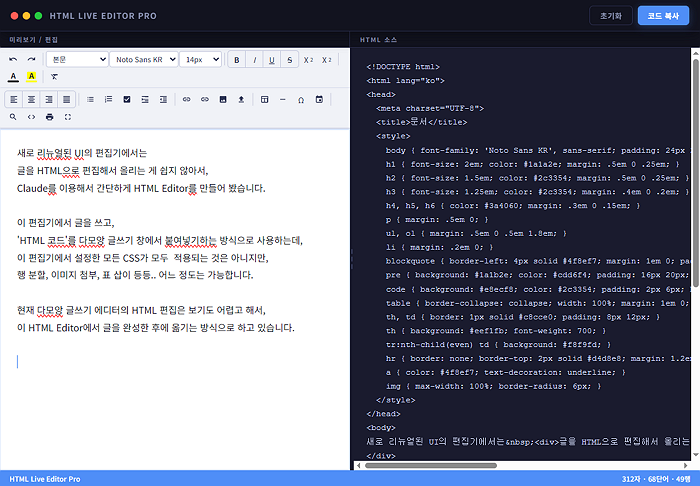
글을 HTML으로 편집해서 올리는 게 쉽지 않아서,
Claude를 이용해서 간단하게 HTML Editor를 만들어 봤습니다.
이 편집기에서 글을 쓰고,
'HTML 코드'를 다모앙 글쓰기 창에서 붙여넣기하는 방식으로 사용하는데,
이 편집기에서 설정한 모든 CSS가 모두 적용되는 것은 아니지만,
행 분할, 이미지 첨부, 표 삽이 등등.. 어느 정도는 가능합니다.
현재 다모앙 글쓰기 에디터의 HTML 편집은 보기도 어렵고 해서,
이 HTML Editor에서 글을 완성한 후에 옮기는 방식으로 하고 있습니다.
이 파일은 단일한 html 파일로,
브라우저에서 이 파일을 열어서 사용하시면 됩니다.
왼쪽의 '미리보기' 창에서도 편집이 가능하고,
오른쪽의 'HTML 소스' 창에서도 편집이 가능합니다.
원래는 파일을 올려드리려고 했는데,
아직은 '파일 첨부' 기능이 정상작동하지 않아서,
아래 원본 HTML 코드를 그대로 올려드립니다.
복사해서 'HtmlEditor_v0.93.html'로 저장하신 후,
브라우저에서 열어서 사용하시면 됩니다.
<!DOCTYPE html>
<html lang="ko">
<head>
<meta charset="UTF-8">
<meta name="viewport" content="width=device-width, initial-scale=1.0">
<title>HTML Live Editor Pro</title>
<link href="https://fonts.googleapis.com/css2?family=Noto+Sans+KR:wght@400;500;600;700&display=swap" rel="stylesheet">
<style>
*{margin:0;padding:0;box-sizing:border-box;}
:root{
--bg:#1a1b2e;--bar:#12131f;--border:#2a2d4a;--accent:#4f8ef7;
--text:#e2e4f0;--text2:#8890b0;
--tb-hover:#2a2d4a;--tb-active:#3a4060;
--sep:#2e3150;--shadow:0 4px 24px rgba(0,0,0,0.4);
}
body{display:flex;flex-direction:column;height:100vh;background:var(--bg);font-family:'Noto Sans KR',sans-serif;overflow:hidden;color:var(--text);}
#app-header{
display:flex;align-items:center;justify-content:space-between;
padding:0 18px;height:50px;background:var(--bar);
border-bottom:1px solid var(--border);flex-shrink:0;
box-shadow:var(--shadow);z-index:20;
}
.app-dots{display:flex;gap:7px;align-items:center;}
.dot{width:12px;height:12px;border-radius:50%;}
.dot-r{background:#ff5f57;}.dot-y{background:#ffbd2e;}.dot-g{background:#28ca41;}
.app-title{font-size:13px;font-weight:700;color:var(--text2);letter-spacing:1px;text-transform:uppercase;margin-left:12px;}
.hdr-btns{display:flex;gap:8px;}
.hdr-btn{padding:6px 16px;border-radius:6px;border:none;font-size:12px;font-weight:700;font-family:inherit;cursor:pointer;transition:all .2s;letter-spacing:.5px;}
#btn-reset{background:transparent;border:1px solid var(--border);color:var(--text2);}
#btn-reset:hover{background:var(--tb-hover);color:var(--text);}
#btn-copy{background:var(--accent);color:#fff;box-shadow:0 2px 12px rgba(79,142,247,.35);}
#btn-copy:hover{background:#3a7ae8;}
#btn-copy.ok{background:#22c55e;}
#panel-labels{display:flex;background:var(--bar);border-bottom:1px solid var(--border);flex-shrink:0;}
.plabel{padding:5px 16px;font-size:10px;color:var(--text2);font-weight:700;letter-spacing:1.5px;text-transform:uppercase;}
#lbl-pre{border-right:1px solid var(--border);}
#main{display:flex;flex:1;overflow:hidden;position:relative;}
#preview-panel{display:flex;flex-direction:column;background:#fff;flex-shrink:0;overflow:hidden;}
#rte-toolbar{
background:#f0f2f7;border-bottom:2px solid #d4d8e8;
flex-shrink:0;user-select:none;
}
.tb-row{
display:flex;flex-wrap:wrap;align-items:center;
gap:1px;padding:4px 8px;
border-bottom:1px solid #dde0ee;
}
.tb-row:last-child{border-bottom:none;}
.tb{
display:inline-flex;align-items:center;justify-content:center;
min-width:28px;height:26px;padding:0 5px;
background:transparent;border:1px solid transparent;
border-radius:4px;cursor:pointer;font-size:12px;
font-family:'Noto Sans KR',sans-serif;color:#2c3354;
transition:all .15s;white-space:nowrap;gap:3px;
}
.tb:hover{background:#dde3f0;border-color:#b8c0d8;}
.tb.on{background:#c5d3f0;border-color:#4f8ef7;color:#1a3a8f;}
.tb svg{width:14px;height:14px;fill:currentColor;pointer-events:none;flex-shrink:0;}
.tb-sep{width:1px;height:20px;background:#cdd0e0;margin:0 3px;flex-shrink:0;}
.tb-sel{
height:26px;padding:0 6px;font-size:11.5px;
border:1px solid #c8cce0;border-radius:4px;
background:#fff;color:#2c3354;cursor:pointer;
font-family:inherit;
}
.tb-sel:focus{outline:none;border-color:var(--accent);}
.color-wrap{position:relative;display:inline-flex;flex-direction:column;align-items:center;justify-content:center;min-width:28px;height:26px;cursor:pointer;border:1px solid transparent;border-radius:4px;transition:all .15s;}
.color-wrap:hover{background:#dde3f0;border-color:#b8c0d8;}
.color-wrap input[type=color]{position:absolute;inset:0;opacity:0;width:100%;height:100%;cursor:pointer;border:none;padding:0;}
.color-label{font-size:12px;font-weight:800;pointer-events:none;line-height:1;}
.color-bar{width:18px;height:3px;border-radius:2px;pointer-events:none;margin-top:2px;}
.tb-group{display:inline-flex;border:1px solid #c8cce0;border-radius:5px;overflow:hidden;}
.tb-group .tb{border-radius:0;border:none;border-right:1px solid #c8cce0;}
.tb-group .tb:last-child{border-right:none;}
.tb-group .tb.on{background:#c5d3f0;}
#rte-body{
flex:1;overflow-y:auto;padding:24px 28px;
outline:none;line-height:1.85;font-family:'Noto Sans KR',sans-serif;
font-size:15px;color:#1a1a2e;background:#fff;
caret-color:#4f8ef7;
}
#rte-body:focus{box-shadow:inset 0 0 0 2px rgba(79,142,247,.2);}
#rte-body h1{font-size:2em;color:#1a1a2e;margin:.5em 0 .25em;}
#rte-body h2{font-size:1.5em;color:#2c3354;margin:.5em 0 .25em;}
#rte-body h3{font-size:1.25em;color:#2c3354;margin:.5em 0 .25em;}
#rte-body h4,#rte-body h5,#rte-body h6{color:#3a4060;}
#rte-body blockquote{border-left:4px solid #4f8ef7;margin:1em 0;padding:10px 18px;background:#f0f5ff;color:#3a4060;border-radius:0 8px 8px 0;}
#rte-body pre{background:#1a1b2e;color:#cdd6f4;padding:16px 20px;border-radius:8px;overflow-x:auto;font-size:13px;font-family:'Courier New',monospace;margin:1em 0;}
#rte-body code{background:#e8ecf8;color:#2c3354;padding:2px 6px;border-radius:4px;font-size:.9em;font-family:'Courier New',monospace;}
#rte-body table{border-collapse:collapse;width:100%;margin:1em 0;font-size:14px;}
#rte-body th,#rte-body td{border:1px solid #c8cce0;padding:8px 12px;}
#rte-body th{background:#eef1fb;font-weight:700;color:#2c3354;}
#rte-body tr:nth-child(even) td{background:#f8f9fd;}
#rte-body hr{border:none;border-top:2px solid #d4d8e8;margin:1.2em 0;}
#rte-body a{color:#4f8ef7;text-decoration:underline;}
#rte-body img{max-width:100%;border-radius:6px;}
#rte-body ul,#rte-body ol{margin:.5em 0 .5em 1.8em;}
#rte-body li{margin:.2em 0;}
#rte-body ul.checklist{list-style:none;margin-left:.5em;}
#rte-body ul.checklist li{display:flex;align-items:flex-start;gap:8px;}
#rte-body ul.checklist li input{margin-top:4px;accent-color:#4f8ef7;}
#divider{
width:6px;background:#1a1b2e;cursor:col-resize;flex-shrink:0;
transition:background .2s;z-index:10;
display:flex;align-items:center;justify-content:center;
}
#divider:hover,#divider.on{background:#4f8ef7;}
#div-dots{display:flex;flex-direction:column;gap:4px;}
.dd{width:2px;height:8px;background:#3a4060;border-radius:1px;}
#editor-panel{flex:1;display:flex;flex-direction:column;overflow:hidden;background:#1a1b2e;}
#code-editor{
flex:1;background:#1a1b2e;color:#cdd6f4;border:none;outline:none;
padding:20px;font-size:13px;font-family:'Courier New','Monaco',monospace;
line-height:1.7;resize:none;tab-size:2;
white-space:pre;overflow-wrap:normal;overflow-x:auto;overflow-y:auto;
}
#statusbar{
display:flex;align-items:center;justify-content:space-between;
padding:0 16px;height:26px;background:var(--accent);flex-shrink:0;
}
.stext{color:#fff;font-size:11px;font-weight:600;}
#drag-overlay{display:none;position:absolute;inset:0;cursor:col-resize;z-index:100;}
#drag-overlay.on{display:block;}
.popup-bg{display:none;position:fixed;inset:0;background:rgba(0,0,0,.5);z-index:200;align-items:center;justify-content:center;}
.popup-bg.open{display:flex;}
.popup{background:#fff;border-radius:10px;padding:24px;min-width:360px;box-shadow:0 8px 40px rgba(0,0,0,.3);}
.popup h3{font-size:16px;font-weight:700;color:#1a1a2e;margin-bottom:16px;}
.popup label{font-size:13px;color:#3a4060;font-weight:600;display:block;margin-bottom:4px;}
.popup input,.popup select{width:100%;padding:8px 12px;border:1px solid #c8cce0;border-radius:6px;font-size:13px;font-family:inherit;outline:none;margin-bottom:12px;color:#1a1a2e;}
.popup input:focus{border-color:#4f8ef7;}
.popup-btns{display:flex;gap:8px;justify-content:flex-end;margin-top:8px;}
.pop-ok{background:#4f8ef7;color:#fff;border:none;padding:8px 20px;border-radius:6px;font-weight:700;cursor:pointer;font-family:inherit;}
.pop-ok:hover{background:#3a7ae8;}
.pop-cancel{background:transparent;color:#666;border:1px solid #ccc;padding:8px 20px;border-radius:6px;font-weight:600;cursor:pointer;font-family:inherit;}
#find-panel{
display:none;position:absolute;top:8px;right:8px;
background:#fff;border:1px solid #c8cce0;border-radius:8px;
padding:12px 14px;z-index:50;box-shadow:0 4px 20px rgba(0,0,0,.15);min-width:300px;
}
#find-panel.open{display:block;}
#find-panel label{font-size:11px;color:#555;font-weight:600;display:block;margin-bottom:3px;}
#find-panel input{width:100%;padding:5px 8px;border:1px solid #c8cce0;border-radius:5px;font-size:12px;font-family:inherit;outline:none;margin-bottom:8px;}
#find-panel input:focus{border-color:#4f8ef7;}
.find-row{display:flex;gap:6px;margin-top:4px;}
.find-btn{padding:5px 10px;border:none;border-radius:5px;font-size:11px;font-weight:700;cursor:pointer;font-family:inherit;}
.find-btn.pri{background:#4f8ef7;color:#fff;}
.find-btn.sec{background:#eef1fb;color:#2c3354;border:1px solid #c8cce0;}
.find-close{position:absolute;top:8px;right:8px;background:none;border:none;font-size:16px;cursor:pointer;color:#888;line-height:1;}
</style>
</head>
<body>
<div id="app-header">
<div style="display:flex;align-items:center;">
<div class="app-dots">
<div class="dot dot-r"></div><div class="dot dot-y"></div><div class="dot dot-g"></div>
</div>
<span class="app-title">HTML Live Editor Pro</span>
</div>
<div class="hdr-btns">
<button class="hdr-btn" id="btn-reset">초기화</button>
<button class="hdr-btn" id="btn-copy">코드 복사</button>
</div>
</div>
<div id="panel-labels">
<div class="plabel" id="lbl-pre" style="width:50%">미리보기 / 편집</div>
<div class="plabel">HTML 소스</div>
</div>
<div id="main">
<div id="preview-panel" style="width:50%">
<div id="rte-toolbar">
<div class="tb-row">
<button class="tb" title="실행 취소" onclick="x('undo')"><svg viewBox="0 0 24 24"><path d="M12.5 8c-2.65 0-5.05 1-6.9 2.6L2 7v9h9l-3.62-3.62A7.11 7.11 0 0112.5 10.5c3.54 0 6.55 2.31 7.6 5.5l2.37-.78C21.08 11.03 17.15 8 12.5 8z"/></svg></button>
<button class="tb" title="다시 실행" onclick="x('redo')"><svg viewBox="0 0 24 24"><path d="M18.4 10.6C16.55 9 14.15 8 11.5 8c-4.65 0-8.58 3.03-9.96 7.22L3.9 15.7c1.05-3.19 4.05-5.5 7.6-5.5 1.95 0 3.73.72 5.12 1.88L13 15h9V6l-3.6 4.6z"/></svg></button>
<div class="tb-sep"></div>
<select class="tb-sel" id="sel-block" onchange="applyBlock(this.value)" style="width:100px;">
<option value="p">본문</option><option value="h1">제목 1</option><option value="h2">제목 2</option>
<option value="h3">제목 3</option><option value="h4">제목 4</option><option value="h5">제목 5</option>
<option value="h6">제목 6</option><option value="blockquote">인용문</option><option value="pre">코드블록</option>
</select>
<select class="tb-sel" id="sel-font" onchange="x('fontName',this.value)" style="width:110px;">
<option value="Noto Sans KR">Noto Sans KR</option><option value="나눔고딕">나눔고딕</option>
<option value="나눔명조">나눔명조</option><option value="맑은 고딕">맑은 고딕</option>
<option value="굴림">굴림</option><option value="바탕">바탕</option>
<option value="Arial">Arial</option><option value="Georgia">Georgia</option>
<option value="Times New Roman">Times New Roman</option><option value="Courier New">Courier New</option>
<option value="Verdana">Verdana</option><option value="Trebuchet MS">Trebuchet MS</option>
</select>
<select class="tb-sel" id="sel-size" onchange="applyFontSize(this.value)" style="width:68px;">
<option value="8">8px</option><option value="9">9px</option><option value="10">10px</option>
<option value="11">11px</option><option value="12">12px</option><option value="13">13px</option>
<option value="14" selected>14px</option><option value="16">16px</option><option value="18">18px</option>
<option value="20">20px</option><option value="24">24px</option><option value="28">28px</option>
<option value="32">32px</option><option value="36">36px</option><option value="48">48px</option>
<option value="64">64px</option><option value="72">72px</option>
</select>
<div class="tb-sep"></div>
<div class="tb-group">
<button class="tb" id="tb-bold" title="굵게" onclick="x('bold')"><b>B</b></button>
<button class="tb" id="tb-italic" title="기울임" onclick="x('italic')"><i style="font-style:italic">I</i></button>
<button class="tb" id="tb-underline" title="밑줄" onclick="x('underline')"><u>U</u></button>
<button class="tb" id="tb-strike" title="취소선" onclick="x('strikeThrough')"><s>S</s></button>
</div>
<button class="tb" id="tb-sup" title="위 첨자" onclick="toggleSup()">X<sup style="font-size:8px">2</sup></button>
<button class="tb" id="tb-sub" title="아래 첨자" onclick="toggleSub()">X<sub style="font-size:8px">2</sub></button>
<div class="tb-sep"></div>
<div class="color-wrap" title="글자색">
<span class="color-label" style="color:#1a1a2e;">A</span>
<div class="color-bar" id="fc-bar" style="background:#000000;"></div>
<input type="color" id="inp-fc" value="#000000" oninput="applyForeColor(this.value)" onchange="applyForeColor(this.value)">
</div>
<div class="color-wrap" title="형광펜">
<span class="color-label" style="background:#ffff00;padding:0 3px;border-radius:2px;color:#1a1a2e;">A</span>
<div class="color-bar" id="bg-bar" style="background:#ffff00;"></div>
<input type="color" id="inp-bg" value="#ffff00" oninput="applyBgColor(this.value)" onchange="applyBgColor(this.value)">
</div>
<div class="tb-sep"></div>
<button class="tb" title="서식 제거" onclick="x('removeFormat')"><svg viewBox="0 0 24 24"><path d="M3.27 5L2 6.27l6.97 6.97L6.5 19h3l1.57-3.97 4.96 4.97L17 18.73 3.27 5zM6 5v.18L8.82 8H11l-.55 1.39 2.08 2.08L14.3 8H20V5H6z"/></svg></button>
</div>
<div class="tb-row">
<div class="tb-group">
<button class="tb" title="왼쪽 정렬" onclick="x('justifyLeft')"><svg viewBox="0 0 24 24"><path d="M3 3h18v2H3zm0 4h12v2H3zm0 4h18v2H3zm0 4h12v2H3zm0 4h18v2H3z"/></svg></button>
<button class="tb" title="가운데 정렬" onclick="x('justifyCenter')"><svg viewBox="0 0 24 24"><path d="M3 3h18v2H3zm3 4h12v2H6zm-3 4h18v2H3zm3 4h12v2H6zm-3 4h18v2H3z"/></svg></button>
<button class="tb" title="오른쪽 정렬" onclick="x('justifyRight')"><svg viewBox="0 0 24 24"><path d="M3 3h18v2H3zm6 4h12v2H9zm-6 4h18v2H3zm6 4h12v2H9zm-6 4h18v2H3z"/></svg></button>
<button class="tb" title="양쪽 정렬" onclick="x('justifyFull')"><svg viewBox="0 0 24 24"><path d="M3 3h18v2H3zm0 4h18v2H3zm0 4h18v2H3zm0 4h18v2H3zm0 4h18v2H3z"/></svg></button>
</div>
<div class="tb-sep"></div>
<button class="tb" title="글머리 목록" onclick="x('insertUnorderedList')"><svg viewBox="0 0 24 24"><path d="M4 6h2v2H4zm0 5h2v2H4zm0 5h2v2H4zm4-10h12v2H8zm0 5h12v2H8zm0 5h12v2H8z"/></svg></button>
<button class="tb" title="번호 목록" onclick="x('insertOrderedList')"><svg viewBox="0 0 24 24"><path d="M2 17h2v.5H3v1h1v.5H2v1h3v-4H2v1zm1-9h1V4H2v1h1v3zm-1 3h1.8L2 13.1v.9h3v-1H3.2L5 10.9V10H2v1zm5-8v2h14V3H7zm0 14h14v-2H7v2zm0-6h14v-2H7v2z"/></svg></button>
<button class="tb" title="체크리스트" onclick="insertChecklist()"><svg viewBox="0 0 24 24"><path d="M19 3H5c-1.1 0-2 .9-2 2v14c0 1.1.9 2 2 2h14c1.1 0 2-.9 2-2V5c0-1.1-.9-2-2-2zm-9 14l-5-5 1.41-1.41L10 14.17l7.59-7.59L19 8l-9 9z"/></svg></button>
<button class="tb" title="들여쓰기" onclick="x('indent')"><svg viewBox="0 0 24 24"><path d="M3 21h18v-2H3v2zM3 8v8l4-4-4-4zm8 9h10v-2H11v2zm-8-4h18v-2H3v2zm8-9v2h10V4H11zM3 3v2h18V3H3z"/></svg></button>
<button class="tb" title="내어쓰기" onclick="x('outdent')"><svg viewBox="0 0 24 24"><path d="M11 17h10v-2H11v2zm-8-5l4 4V8l-4 4zm0 9h18v-2H3v2zM3 3v2h18V3H3zm8 6h10V7H11v2zm0 4h10v-2H11v2z"/></svg></button>
<div class="tb-sep"></div>
<button class="tb" title="링크 삽입" onclick="openLinkPopup()"><svg viewBox="0 0 24 24"><path d="M3.9 12c0-1.71 1.39-3.1 3.1-3.1h4V7H7c-2.76 0-5 2.24-5 5s2.24 5 5 5h4v-1.9H7c-1.71 0-3.1-1.39-3.1-3.1zM8 13h8v-2H8v2zm9-6h-4v1.9h4c1.71 0 3.1 1.39 3.1 3.1s-1.39 3.1-3.1 3.1h-4V17h4c2.76 0 5-2.24 5-5s-2.24-5-5-5z"/></svg></button>
<button class="tb" title="링크 해제" onclick="x('unlink')"><svg viewBox="0 0 24 24"><path d="M17 7h-4v2h4c1.65 0 3 1.35 3 3s-1.35 3-3 3h-4v2h4c2.76 0 5-2.24 5-5s-2.24-5-5-5zm-6 8H7c-1.65 0-3-1.35-3-3s1.35-3 3-3h4V7H7c-2.76 0-5 2.24-5 5s2.24 5 5 5h4v-2zm-3-4h8v2H8v-2z"/></svg></button>
<button class="tb" title="이미지 URL 삽입" onclick="openImgPopup()"><svg viewBox="0 0 24 24"><path d="M21 19V5c0-1.1-.9-2-2-2H5c-1.1 0-2 .9-2 2v14c0 1.1.9 2 2 2h14c1.1 0 2-.9 2-2zM8.5 13.5l2.5 3.01L14.5 12l4.5 6H5l3.5-4.5z"/></svg></button>
<button class="tb" title="이미지 파일 업로드" onclick="triggerUpload()"><svg viewBox="0 0 24 24"><path d="M9 16h6v-6h4l-7-7-7 7h4zm-4 2h14v2H5z"/></svg></button>
<input type="file" id="img-upload" accept="image/*" style="display:none" onchange="handleUpload(event)">
<div class="tb-sep"></div>
<button class="tb" title="표 삽입" onclick="openTablePopup()"><svg viewBox="0 0 24 24"><path d="M20 3H5c-1.1 0-2 .9-2 2v14c0 1.1.9 2 2 2h15c1.1 0 2-.9 2-2V5c0-1.1-.9-2-2-2zm0 2v3H5V5h15zm-9 14h-6v-9h6v9zm8 0h-6v-9h6v9z"/></svg></button>
<button class="tb" title="수평선 삽입" onclick="x('insertHorizontalRule')"><svg viewBox="0 0 24 24"><path d="M19 13H5v-2h14v2z"/></svg></button>
<button class="tb" title="특수문자 삽입" onclick="openSpecialPopup()">Ω</button>
<button class="tb" title="날짜/시간 삽입" onclick="insertDateTime()"><svg viewBox="0 0 24 24"><path d="M17 12h-5v5h5v-5zM16 1v2H8V1H6v2H5c-1.11 0-1.99.9-1.99 2L3 19c0 1.1.89 2 2 2h14c1.1 0 2-.9 2-2V5c0-1.1-.9-2-2-2h-1V1h-2zm3 18H5V8h14v11z"/></svg></button>
<div class="tb-sep"></div>
<button class="tb" title="찾기/바꾸기" onclick="toggleFind()"><svg viewBox="0 0 24 24"><path d="M15.5 14h-.79l-.28-.27A6.471 6.471 0 0016 9.5 6.5 6.5 0 109.5 16c1.61 0 3.09-.59 4.23-1.57l.27.28v.79l5 4.99L20.49 19l-4.99-5zm-6 0C7.01 14 5 11.99 5 9.5S7.01 5 9.5 5 14 7.01 14 9.5 11.99 14 9.5 14z"/></svg></button>
<button class="tb" id="tb-src" title="소스 보기" onclick="toggleSource()"><svg viewBox="0 0 24 24"><path d="M9.4 16.6L4.8 12l4.6-4.6L8 6l-6 6 6 6 1.4-1.4zm5.2 0l4.6-4.6-4.6-4.6L16 6l6 6-6 6-1.4-1.4z"/></svg></button>
<button class="tb" title="인쇄" onclick="printContent()"><svg viewBox="0 0 24 24"><path d="M19 8H5c-1.66 0-3 1.34-3 3v6h4v4h12v-4h4v-6c0-1.66-1.34-3-3-3zm-3 11H8v-5h8v5zm3-7c-.55 0-1-.45-1-1s.45-1 1-1 1 .45 1 1-.45 1-1 1zm-1-9H6v4h12V3z"/></svg></button>
<button class="tb" id="tb-full" title="전체화면" onclick="toggleFullscreen()"><svg viewBox="0 0 24 24"><path d="M7 14H5v5h5v-2H7v-3zm-2-4h2V7h3V5H5v5zm12 7h-3v2h5v-5h-2v3zM14 5v2h3v3h2V5h-5z"/></svg></button>
</div>
</div>
<div id="rte-body" contenteditable="true"></div>
<div id="find-panel">
<button class="find-close" onclick="toggleFind()">×</button>
<label>찾기</label>
<input type="text" id="find-input" placeholder="검색어..." onkeydown="if(event.key==='Enter')findNext()">
<label>바꾸기</label>
<input type="text" id="replace-input" placeholder="바꿀 텍스트...">
<div class="find-row">
<button class="find-btn pri" onclick="findNext()">다음</button>
<button class="find-btn sec" onclick="findPrev()">이전</button>
<button class="find-btn sec" onclick="replaceOne()">바꾸기</button>
<button class="find-btn sec" onclick="replaceAll()">모두 바꾸기</button>
</div>
</div>
</div>
<div id="divider">
<div id="div-dots"><div class="dd"></div><div class="dd"></div><div class="dd"></div></div>
</div>
<div id="editor-panel">
<textarea id="code-editor" spellcheck="false"></textarea>
</div>
<div id="drag-overlay"></div>
</div>
<div id="statusbar">
<span class="stext">HTML Live Editor Pro</span>
<span class="stext" id="st-info">0자 · 0단어 · 1행</span>
</div>
<!-- 팝업들 -->
<div class="popup-bg" id="link-popup">
<div class="popup">
<h3>링크 삽입</h3>
<label>링크 텍스트</label><input type="text" id="link-text" placeholder="표시할 텍스트">
<label>URL</label><input type="url" id="link-url" placeholder="https://">
<label>열기 방식</label>
<select id="link-target"><option value="">같은 창</option><option value="_blank">새 창</option></select>
<div class="popup-btns">
<button class="pop-cancel" onclick="closePopup('link-popup')">취소</button>
<button class="pop-ok" onclick="doInsertLink()">삽입</button>
</div>
</div>
</div>
<div class="popup-bg" id="img-popup">
<div class="popup">
<h3>이미지 삽입</h3>
<label>이미지 URL</label><input type="url" id="img-url" placeholder="https://...">
<label>대체 텍스트</label><input type="text" id="img-alt" placeholder="이미지 설명">
<label>너비 px (비워두면 100%)</label><input type="text" id="img-width" placeholder="예: 400">
<div class="popup-btns">
<button class="pop-cancel" onclick="closePopup('img-popup')">취소</button>
<button class="pop-ok" onclick="doInsertImg()">삽입</button>
</div>
</div>
</div>
<div class="popup-bg" id="table-popup">
<div class="popup">
<h3>표 삽입</h3>
<label>행 수</label><input type="number" id="tbl-rows" value="3" min="1" max="20">
<label>열 수</label><input type="number" id="tbl-cols" value="3" min="1" max="10">
<label>스타일</label>
<select id="tbl-style"><option value="basic">기본</option><option value="stripe">줄무늬</option><option value="border">전체 테두리</option></select>
<div class="popup-btns">
<button class="pop-cancel" onclick="closePopup('table-popup')">취소</button>
<button class="pop-ok" onclick="doInsertTable()">삽입</button>
</div>
</div>
</div>
<div class="popup-bg" id="special-popup">
<div class="popup" style="min-width:420px;">
<h3>특수문자 삽입</h3>
<div id="special-grid" style="display:flex;flex-wrap:wrap;gap:4px;max-height:220px;overflow-y:auto;margin-bottom:16px;"></div>
<div class="popup-btns"><button class="pop-cancel" onclick="closePopup('special-popup')">닫기</button></div>
</div>
</div>
<script>
/* ── 초기 콘텐츠 ── */
const INIT = `<h1>HTML Live Editor Pro</h1>
<p>위의 서식 툴바로 텍스트를 꾸미거나, 오른쪽 코드 에디터에서 직접 수정해보세요.</p>
<blockquote>양방향 동기화: 미리보기를 편집하면 코드가, 코드를 편집하면 미리보기가 즉시 반영됩니다.</blockquote>
<h2>서식 예시</h2>
<p>텍스트를 선택한 뒤 툴바의 버튼을 눌러보세요. <strong>굵게</strong>, <em>기울임</em>, <u>밑줄</u>, <s>취소선</s> 등을 적용할 수 있습니다.</p>
<ul><li>글머리 목록 항목 1</li><li>글머리 목록 항목 2</li></ul>
<ol><li>번호 목록 항목 1</li><li>번호 목록 항목 2</li></ol>
<table><tr><th>항목</th><th>내용</th><th>비고</th></tr><tr><td>예시 1</td><td>내용 A</td><td>비고 A</td></tr><tr><td>예시 2</td><td>내용 B</td><td>비고 B</td></tr></table>`;
/* ── DOM ── */
const rte = document.getElementById('rte-body');
const ce = document.getElementById('code-editor');
const stInfo = document.getElementById('st-info');
const btnCopy = document.getElementById('btn-copy');
const btnRst = document.getElementById('btn-reset');
const divEl = document.getElementById('divider');
const prePane = document.getElementById('preview-panel');
const lbl = document.getElementById('lbl-pre');
const mainEl = document.getElementById('main');
const dragOvl = document.getElementById('drag-overlay');
let lock=false, srcMode=false;
/* ══════════════════════════════════════════════
HTML 포매터 (핵심 기능)
- 태그별로 줄바꿈 + 들여쓰기 적용
══════════════════════════════════════════════ */
function formatHTML(html) {
const INLINE = new Set(['a','abbr','acronym','b','bdo','big','br','button','cite',
'code','dfn','em','i','img','input','kbd','label','map','object','output',
'q','samp','select','small','span','strong','sub','sup','textarea','time',
'tt','u','var']);
// 1. 한 줄로 압축
let str = html
.replace(/\r\n|\r|\n/g, ' ')
.replace(/\s{2,}/g, ' ')
.trim();
// 2. 태그 앞뒤 공백 정규화
str = str
.replace(/> </g, '>\n<')
.replace(/></g, '>\n<');
// 3. 들여쓰기 적용
const lines = str.split('\n');
let indent = 0;
const PAD = ' '; // 들여쓰기 단위: 공백 2칸
const result = [];
for (let raw of lines) {
const line = raw.trim();
if (!line) continue;
// 닫는 태그 → 들여쓰기 감소 후 출력
const closeMatch = line.match(/^<\/([a-zA-Z0-9]+)/);
if (closeMatch) {
const tag = closeMatch[1].toLowerCase();
if (!INLINE.has(tag)) indent = Math.max(0, indent - 1);
}
result.push(PAD.repeat(indent) + line);
// 여는 태그 → 들여쓰기 증가 (self-closing, doctype, 주석 제외)
const openMatch = line.match(/^<([a-zA-Z0-9]+)([^>]*)>/);
if (openMatch) {
const tag = openMatch[1].toLowerCase();
const attr = openMatch[2];
const selfClose = /\/>$/.test(line) ||
['area','base','br','col','embed','hr','img','input',
'link','meta','param','source','track','wbr'].includes(tag);
const hasClose = line.includes('</' + tag + '>');
if (!selfClose && !hasClose && !INLINE.has(tag)) indent++;
}
}
return result.join('\n');
}
/* ── HTML 빌드 ── */
function buildHTML(body) {
const formatted = formatHTML(body);
return `<!DOCTYPE html>
<html lang="ko">
<head>
<meta charset="UTF-8">
<title>문서</title>
<style>
body { font-family: 'Noto Sans KR', sans-serif; padding: 24px 28px; background: #fff; color: #1a1a2e; line-height: 1.85; font-size: 15px; }
h1 { font-size: 2em; color: #1a1a2e; margin: .5em 0 .25em; }
h2 { font-size: 1.5em; color: #2c3354; margin: .5em 0 .25em; }
h3 { font-size: 1.25em; color: #2c3354; margin: .4em 0 .2em; }
h4, h5, h6 { color: #3a4060; margin: .3em 0 .15em; }
p { margin: .5em 0; }
ul, ol { margin: .5em 0 .5em 1.8em; }
li { margin: .2em 0; }
blockquote { border-left: 4px solid #4f8ef7; margin: 1em 0; padding: 10px 18px; background: #f0f5ff; color: #3a4060; border-radius: 0 8px 8px 0; }
pre { background: #1a1b2e; color: #cdd6f4; padding: 16px 20px; border-radius: 8px; overflow-x: auto; font-size: 13px; font-family: 'Courier New', monospace; }
code { background: #e8ecf8; color: #2c3354; padding: 2px 6px; border-radius: 4px; font-size: .9em; font-family: 'Courier New', monospace; }
table { border-collapse: collapse; width: 100%; margin: 1em 0; font-size: 14px; }
th, td { border: 1px solid #c8cce0; padding: 8px 12px; }
th { background: #eef1fb; font-weight: 700; }
tr:nth-child(even) td { background: #f8f9fd; }
hr { border: none; border-top: 2px solid #d4d8e8; margin: 1.2em 0; }
a { color: #4f8ef7; text-decoration: underline; }
img { max-width: 100%; border-radius: 6px; }
</style>
</head>
<body>
${formatted}
</body>
</html>`;
}
function extractBody(html) {
const m = html.match(/<body[^>]*>([\s\S]*?)<\/body>/i);
return m ? m[1].trim() : html;
}
/* ── 동기화 ── */
function rteToCode() {
if (lock) return;
lock = true;
ce.value = buildHTML(rte.innerHTML);
updateStatus();
lock = false;
}
let cTimer = null;
function codeToRte() {
if (lock) return;
clearTimeout(cTimer);
cTimer = setTimeout(() => {
lock = true;
rte.innerHTML = extractBody(ce.value);
updateStatus();
lock = false;
}, 350);
}
rte.addEventListener('input', rteToCode);
rte.addEventListener('keyup', updateTbState);
rte.addEventListener('mouseup', updateTbState);
ce.addEventListener('input', () => { codeToRte(); updateStatus(); });
ce.addEventListener('keydown', e => {
if (e.key === 'Tab') {
e.preventDefault();
const s = ce.selectionStart, en = ce.selectionEnd;
ce.value = ce.value.substring(0, s) + ' ' + ce.value.substring(en);
ce.selectionStart = ce.selectionEnd = s + 2;
}
});
/* ── execCommand 래퍼 ── */
function x(cmd, val) {
rte.focus();
document.execCommand(cmd, false, val || null);
rteToCode(); updateTbState();
}
function applyBlock(tag) {
rte.focus();
document.execCommand('formatBlock', false, '<' + tag + '>');
rteToCode();
}
function applyFontSize(px) {
rte.focus();
const sel = window.getSelection();
if (!sel.rangeCount) return;
const range = sel.getRangeAt(0);
if (!range.collapsed) {
const span = document.createElement('span');
span.style.fontSize = px + 'px';
try { range.surroundContents(span); } catch(e) { document.execCommand('fontSize',false,'3'); }
rteToCode();
}
}
function applyForeColor(v) { document.getElementById('fc-bar').style.background = v; x('foreColor', v); }
function applyBgColor(v) { document.getElementById('bg-bar').style.background = v; x('hiliteColor', v); }
function toggleSup() {
if (document.queryCommandState('superscript')) x('superscript');
else { document.execCommand('subscript',false,null); x('superscript'); }
}
function toggleSub() {
if (document.queryCommandState('subscript')) x('subscript');
else { document.execCommand('superscript',false,null); x('subscript'); }
}
function insertChecklist() {
rte.focus();
document.execCommand('insertHTML', false,
'<ul class="checklist"><li><input type="checkbox"> 항목 1</li><li><input type="checkbox"> 항목 2</li></ul>');
rteToCode();
}
function insertDateTime() {
const n = new Date();
const s = n.getFullYear()+'년 '+(n.getMonth()+1)+'월 '+n.getDate()+'일 '+
String(n.getHours()).padStart(2,'0')+':'+String(n.getMinutes()).padStart(2,'0');
document.execCommand('insertHTML', false, '<span>'+s+'</span>');
rteToCode();
}
function triggerUpload() { document.getElementById('img-upload').click(); }
function handleUpload(e) {
const f = e.target.files[0]; if (!f) return;
const r = new FileReader();
r.onload = ev => { rte.focus(); document.execCommand('insertImage', false, ev.target.result); rteToCode(); };
r.readAsDataURL(f);
}
function toggleSource() {
srcMode = !srcMode;
document.getElementById('tb-src').classList.toggle('on', srcMode);
if (srcMode) {
const pre = document.createElement('pre');
pre.id = 'src-view';
pre.style.cssText = 'flex:1;overflow:auto;padding:20px;font-size:12px;background:#f0f2f8;color:#1a1a2e;white-space:pre;word-break:break-all;border:2px dashed #4f8ef7;';
pre.textContent = formatHTML(rte.innerHTML);
rte.style.display = 'none';
rte.parentNode.insertBefore(pre, rte.nextSibling);
} else {
const sv = document.getElementById('src-view');
if (sv) sv.remove();
rte.style.display = '';
rte.focus();
}
}
function printContent() {
const w = window.open('', '_print', 'width=800,height=600');
w.document.write(buildHTML(rte.innerHTML));
w.document.close(); w.focus(); w.print(); w.close();
}
function toggleFullscreen() {
if (!document.fullscreenElement) {
document.documentElement.requestFullscreen();
document.getElementById('tb-full').classList.add('on');
} else {
document.exitFullscreen();
document.getElementById('tb-full').classList.remove('on');
}
}
/* ── 찾기/바꾸기 ── */
function toggleFind() {
const p = document.getElementById('find-panel');
p.classList.toggle('open');
if (p.classList.contains('open')) document.getElementById('find-input').focus();
}
function findNext() { window.find(document.getElementById('find-input').value, false, false, true); }
function findPrev() { window.find(document.getElementById('find-input').value, false, true, true); }
function replaceOne() {
const fv = document.getElementById('find-input').value;
const rv = document.getElementById('replace-input').value;
if (!fv) return;
if (window.find(fv, false, false, true)) { document.execCommand('insertText', false, rv); rteToCode(); }
}
function replaceAll() {
const fv = document.getElementById('find-input').value;
const rv = document.getElementById('replace-input').value;
if (!fv) return;
rte.innerHTML = rte.innerHTML.split(fv).join(rv);
rteToCode();
alert('모두 바꾸기 완료');
}
/* ── 팝업 ── */
function openPopup(id) { document.getElementById(id).classList.add('open'); }
function closePopup(id) { document.getElementById(id).classList.remove('open'); }
document.querySelectorAll('.popup-bg').forEach(bg => {
bg.addEventListener('click', e => { if (e.target === bg) bg.classList.remove('open'); });
});
function openLinkPopup() {
document.getElementById('link-text').value = window.getSelection().toString() || '';
document.getElementById('link-url').value = 'https://';
openPopup('link-popup');
setTimeout(() => document.getElementById('link-url').focus(), 100);
}
function doInsertLink() {
const url = document.getElementById('link-url').value.trim();
const txt = document.getElementById('link-text').value.trim();
const tgt = document.getElementById('link-target').value;
if (!url) { alert('URL을 입력해주세요.'); return; }
rte.focus();
document.execCommand('insertHTML', false,
`<a href="${url}"${tgt ? ' target="'+tgt+'" rel="noopener"' : ''}>${txt || url}</a>`);
closePopup('link-popup'); rteToCode();
}
function openImgPopup() {
document.getElementById('img-url').value = 'https://';
document.getElementById('img-alt').value = '';
document.getElementById('img-width').value = '';
openPopup('img-popup');
setTimeout(() => document.getElementById('img-url').focus(), 100);
}
function doInsertImg() {
const url = document.getElementById('img-url').value.trim();
const alt = document.getElementById('img-alt').value.trim();
const w = document.getElementById('img-width').value.trim();
if (!url) { alert('이미지 URL을 입력해주세요.'); return; }
rte.focus();
document.execCommand('insertHTML', false,
`<img src="${url}" alt="${alt}" style="${w ? 'width:'+w+'px' : 'max-width:100%'}">`);
closePopup('img-popup'); rteToCode();
}
function openTablePopup() { openPopup('table-popup'); }
function doInsertTable() {
const rows = parseInt(document.getElementById('tbl-rows').value) || 3;
const cols = parseInt(document.getElementById('tbl-cols').value) || 3;
const style = document.getElementById('tbl-style').value;
let t = '<table style="border-collapse:collapse;width:100%;margin:1em 0;font-size:14px;">';
for (let r = 0; r < rows; r++) {
t += '<tr>';
for (let c = 0; c < cols; c++) {
const td = 'border:1px solid #c8cce0;padding:8px 12px;';
if (r === 0) t += `<th style="${td}background:#eef1fb;font-weight:700;">머리글 ${c+1}</th>`;
else {
const bg = (style === 'stripe' && r % 2 === 0) ? 'background:#f8f9fd;' : '';
t += `<td style="${td}${bg}">내용</td>`;
}
}
t += '</tr>';
}
t += '</table>';
rte.focus();
document.execCommand('insertHTML', false, t);
closePopup('table-popup'); rteToCode();
}
const SPECIALS = ['©','®','™','€','£','¥','¢','§','¶','†','‡','•','…','–','—',
'←','→','↑','↓','↔','⇐','⇒','⇑','⇓','⇔','≈','≠','≤','≥','±','×','÷',
'√','∞','∑','∏','∫','α','β','γ','δ','π','σ','Ω','μ','°','′','″',
'¼','½','¾','⅓','⅔','①','②','③','④','⑤','☆','★','♠','♣','♥','♦',
'♪','♫','☀','☁','☂','☃','✓','✗','❤','☎','✉','⚡'];
function openSpecialPopup() {
const grid = document.getElementById('special-grid');
if (!grid.children.length) {
SPECIALS.forEach(ch => {
const b = document.createElement('button');
b.className = 'tb'; b.style.fontSize = '16px'; b.textContent = ch; b.title = ch;
b.onclick = () => { rte.focus(); document.execCommand('insertText', false, ch); rteToCode(); };
grid.appendChild(b);
});
}
openPopup('special-popup');
}
/* ── 툴바 상태 ── */
function updateTbState() {
[['bold','bold'],['italic','italic'],['underline','underline'],
['strike','strikeThrough'],['sup','superscript'],['sub','subscript']].forEach(([id,cmd]) => {
const el = document.getElementById('tb-'+id);
if (el) el.classList.toggle('on', document.queryCommandState(cmd));
});
}
/* ── 상태바 ── */
function updateStatus() {
const txt = rte.innerText || '';
const words = txt.trim().split(/\s+/).filter(Boolean).length;
const lines = ce.value.split('\n').length;
stInfo.textContent = `${txt.length.toLocaleString()}자 · ${words.toLocaleString()}단어 · ${lines}행`;
}
/* ── 복사 / 초기화 ── */
btnCopy.addEventListener('click', () => {
if (navigator.clipboard) navigator.clipboard.writeText(ce.value).then(flash);
else { ce.select(); document.execCommand('copy'); flash(); }
});
function flash() {
btnCopy.textContent = '복사 완료!'; btnCopy.classList.add('ok');
setTimeout(() => { btnCopy.textContent = '코드 복사'; btnCopy.classList.remove('ok'); }, 2000);
}
btnRst.addEventListener('click', () => {
if (confirm('초기 내용으로 되돌리겠습니까?')) {
rte.innerHTML = INIT;
ce.value = buildHTML(INIT);
updateStatus();
}
});
/* ── 드래그 리사이즈 ── */
let drag=false, sx=0, sw=0;
divEl.addEventListener('mousedown', e => {
drag=true; sx=e.clientX; sw=prePane.offsetWidth;
divEl.classList.add('on'); dragOvl.classList.add('on'); e.preventDefault();
});
document.addEventListener('mousemove', e => {
if (!drag) return;
const mw = mainEl.offsetWidth;
let nw = Math.max(mw*.15, Math.min(mw*.85, sw + e.clientX - sx));
const r = (nw / mw * 100).toFixed(2) + '%';
prePane.style.width = r; lbl.style.width = r;
});
document.addEventListener('mouseup', () => {
if (drag) { drag=false; divEl.classList.remove('on'); dragOvl.classList.remove('on'); }
});
/* ── 단축키 ── */
document.addEventListener('keydown', e => {
if ((e.ctrlKey||e.metaKey) && e.key==='h') { e.preventDefault(); toggleFind(); }
});
/* ── 초기 실행 ── */
rte.innerHTML = INIT;
ce.value = buildHTML(INIT);
updateStatus();
</script>
</body>
</html>
감사합니다.
끝.
댓글 (8)
-
 냉
냉냉동실발굴단
03.07 · 61.♡.57.28
뭔지 모르지만 고맙습니다! - 벗
벗님
→ 냉동실발굴단 작성자 03.07 · 61.♡.153.123
이 부분 긁어서 .html 파일로 저장하신 후에, 브라우저에서 이 파일을 열면, 바로 사용하실 수 있습니다. ^^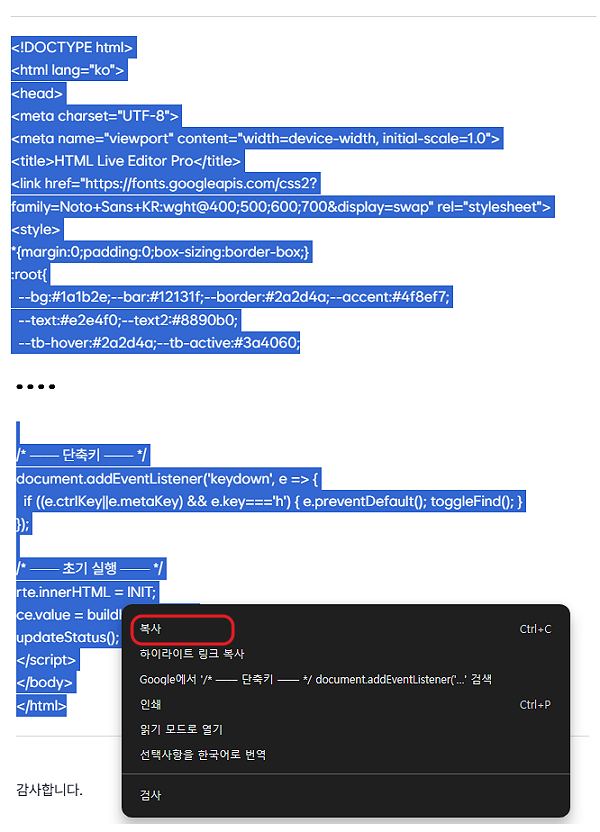
-
 5
55호라
03.07 · 175.♡.10.77
와우 능력자 - 벗
벗님
→ 5호라 작성자 03.07 · 61.♡.153.123
AI한테 잘 설명만 해주면 멋진 결과물을 만들어주네요.
저는 그저 채찍만.. 흐흐흐. ^^; -
 가
가가랑비
→ 벗님 03.07 · 58.♡.137.93
(제 경우)
뭘 알아야 설명을 해주고 결과물 내놓으라고 할텐데 ㅠ
요즘 세상만사를 새로 배우는 느낌으로 지냅니다. ㅎㅎ - 벗
벗님
→ 가랑비 작성자 03.07 · 61.♡.153.123
잠시 'chatGPT'한테 물어봤습니다.
-
 신
신신사아님당
03.07 · 125.♡.243.26
우와~ 진짜 되네요. 싱기방기합니당. O_O - 벗
벗님
→ 신사아님당 작성자 03.07 · 61.♡.153.123
흐흐흐, ^^
댓글을 작성하려면 이 필요합니다.