

 LiNE (210.♡.102.188)
2024년 12월 16일 PM 04:17 · 수정됨(12. 19. 21:22)
tampermonkey 스크립트이므로 해당 계열 확장이 필요합니다. (Violentmonkey 추천)
Violentmonkey : https://chromewebstore.google.com/detail/violentmonkey/jinjaccalgkegednnccohejagnlnfdag
Tampermonkey : https://chromewebstore.google.com/detail/tampermonkey/dhdgffkkebhmkfjojejmpbldmpobfkfo
기능 소개:
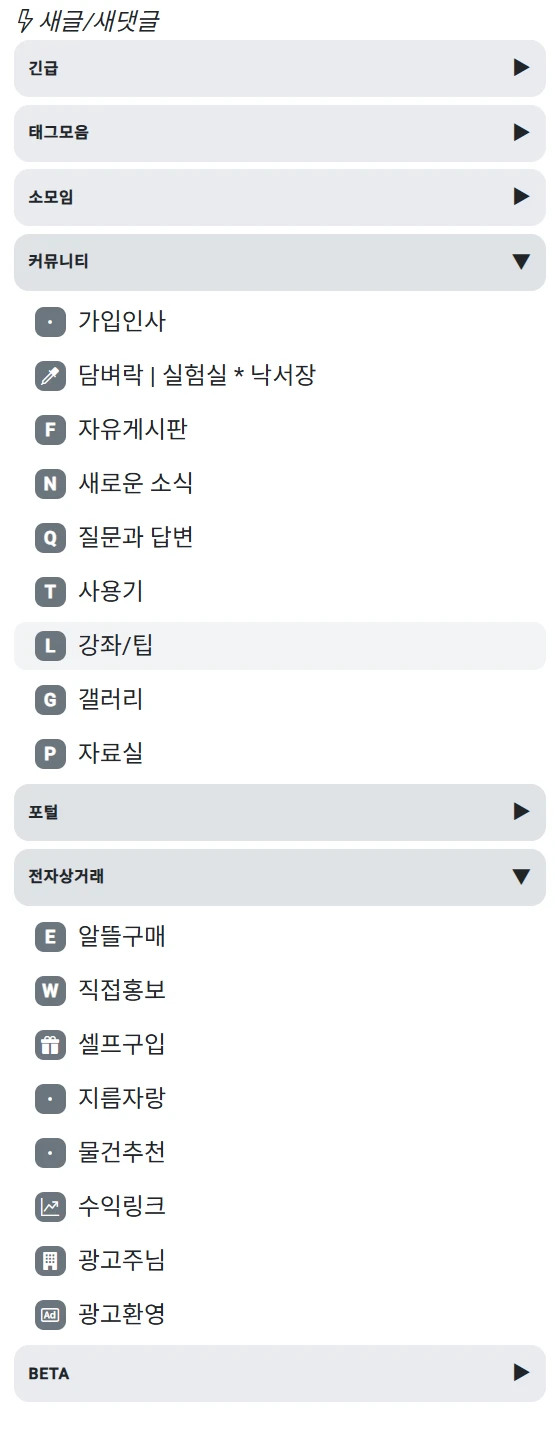
1. 사이드바 (게시판 리스트)에 각 헤더별로 드랍다운 기능을 추가합니다.
2. 위 기능의 설정 값은 브라우저에 저장되어 유지됩니다.
[code=javascript]// ==UserScript==
// @name 다모앙 사이드바 드랍다운 기능 추가
// @version 1.0
// @description 다모앙 사이드바에 드랍다운 기능을 추가합니다.
// @author LiNE
// @match https://damoang.net/*
// @grant none
// ==/UserScript==
(function() {
'use strict';
// 초기화 함수
function init() {
document.querySelectorAll('.dropdown-header').forEach((header, index) => {
const id = `dropdown-header-${index}`;
const menuItems = getNextMenuItems(header);
// 상태 로드
const isHidden = JSON.parse(localStorage.getItem(id)) || false;
// 기존 스타일 및 이벤트가 없을 때 추가
if (!header.querySelector('.toggle-icon')) {
// 기본 스타일 수정
header.style.cursor = 'pointer';
header.style.padding = '10px';
header.style.marginBottom = '5px';
header.style.borderRadius = '10px'; // 곡면 처리
header.style.backgroundColor = '#e9ecef'; // 기본 배경색
header.style.transition = 'background-color 0.3s, box-shadow 0.3s'; // 부드러운 전환
// 마우스 오버 효과
header.addEventListener('mouseover', () => {
header.style.backgroundColor = '#adb5bd'; // 마우스 오버 시 진한 회색
header.style.boxShadow = '0 2px 6px rgba(0, 0, 0, 0.15)';
});
header.addEventListener('mouseout', () => {
header.style.backgroundColor = '#dee2e6'; // 원래 상태로 돌아가기
header.style.boxShadow = 'none';
});
// 클릭 시 배경색 변경 (글자색 유지)
let isClicked = false;
header.addEventListener('click', () => {
isClicked = !isClicked;
header.style.backgroundColor = isClicked ? '#868e96' : '#dee2e6'; // 더 진한 회색으로 변경
// 텍스트 색상은 변경하지 않음
});
// 아이콘 추가
const toggleIcon = document.createElement('span');
toggleIcon.innerText = isHidden ? '▶' : '▼';
toggleIcon.className = 'toggle-icon';
toggleIcon.style.fontSize = '12px';
toggleIcon.style.marginLeft = 'auto'; // 오른쪽 정렬
header.style.display = 'flex';
header.style.alignItems = 'center';
header.appendChild(toggleIcon);
// 초기 상태 적용
if (isHidden) {
menuItems.forEach(item => item.style.display = 'none');
}
// 클릭 이벤트 (토글)
header.addEventListener('click', () => {
const hidden = menuItems[0]?.style.display === 'none';
menuItems.forEach(item => {
item.style.display = hidden ? '' : 'none';
});
toggleIcon.innerText = hidden ? '▼' : '▶';
localStorage.setItem(id, JSON.stringify(!hidden));
});
}
});
}
// 다음 형제 요소 중 메뉴 항목 가져오기
function getNextMenuItems(header) {
const items = [];
let sibling = header.nextElementSibling;
while (sibling && !sibling.classList.contains('dropdown-header')) {
if (sibling.classList.contains('nav-item')) {
items.push(sibling);
}
sibling = sibling.nextElementSibling;
}
return items;
}
// DOM 로드 시 실행
document.addEventListener('DOMContentLoaded', init);
// MutationObserver 추가 (동적 변경 감지)
const observer = new MutationObserver(() => {
init();
});
observer.observe(document.body, {
childList: true,
subtree: true,
});
})();
[/code]
댓글 (3)
- L
LiNE
작성자 24.12.16 · 210.♡.102.188
- L
LiNE
작성자 24.12.16 · 210.♡.102.188
다모앙 코드 에디터가 일부 코드를 이상하게 바꾸네요. 본 게시글에 있는 코드로 안되시면 댓글에 있는 코드로 해보시기 바랍니다. -
 S
SSDK
24.12.19 · 127.♡.0.1
{emo:damoang-emo-008.gif:100}
댓글을 작성하려면 이 필요합니다.
// @name 다모앙 사이드바 드랍다운 기능 추가
// @version 1.0
// @description 다모앙 사이드바에 드랍다운 기능을 추가합니다.
// @author LiNE
// @match https://damoang.net/*
// @grant none
// ==/UserScript==
(function() {
'use strict';
// 초기화 함수
function init() {
document.querySelectorAll('.dropdown-header').forEach((header, index) => {
const id = `dropdown-header-${index}`;
const menuItems = getNextMenuItems(header);
// 상태 로드
const isHidden = JSON.parse(localStorage.getItem(id)) || false;
// 기존 스타일 및 이벤트가 없을 때 추가
if (!header.querySelector('.toggle-icon')) {
// 기본 스타일 수정
header.style.cursor = 'pointer';
header.style.padding = '10px';
header.style.marginBottom = '5px';
header.style.borderRadius = '10px'; // 곡면 처리
header.style.backgroundColor = '#e9ecef'; // 기본 배경색
header.style.transition = 'background-color 0.3s, box-shadow 0.3s'; // 부드러운 전환
// 마우스 오버 효과
header.addEventListener('mouseover', () => {
header.style.backgroundColor = '#adb5bd'; // 마우스 오버 시 진한 회색
header.style.boxShadow = '0 2px 6px rgba(0, 0, 0, 0.15)';
});
header.addEventListener('mouseout', () => {
header.style.backgroundColor = '#dee2e6'; // 원래 상태로 돌아가기
header.style.boxShadow = 'none';
});
// 클릭 시 배경색 변경 (글자색 유지)
let isClicked = false;
header.addEventListener('click', () => {
isClicked = !isClicked;
header.style.backgroundColor = isClicked ? '#868e96' : '#dee2e6'; // 더 진한 회색으로 변경
// 텍스트 색상은 변경하지 않음
});
// 아이콘 추가
const toggleIcon = document.createElement('span');
toggleIcon.innerText = isHidden ? '▶' : '▼';
toggleIcon.className = 'toggle-icon';
toggleIcon.style.fontSize = '12px';
toggleIcon.style.marginLeft = 'auto'; // 오른쪽 정렬
header.style.display = 'flex';
header.style.alignItems = 'center';
header.appendChild(toggleIcon);
// 초기 상태 적용
if (isHidden) {
menuItems.forEach(item => item.style.display = 'none');
}
// 클릭 이벤트 (토글)
header.addEventListener('click', () => {
const hidden = menuItems[0]?.style.display === 'none';
menuItems.forEach(item => {
item.style.display = hidden ? '' : 'none';
});
toggleIcon.innerText = hidden ? '▼' : '▶';
localStorage.setItem(id, JSON.stringify(!hidden));
});
}
});
}
// 다음 형제 요소 중 메뉴 항목 가져오기
function getNextMenuItems(header) {
const items = [];
let sibling = header.nextElementSibling;
while (sibling && !sibling.classList.contains('dropdown-header')) {
if (sibling.classList.contains('nav-item')) {
items.push(sibling);
}
sibling = sibling.nextElementSibling;
}
return items;
}
// DOM 로드 시 실행
document.addEventListener('DOMContentLoaded', init);
// MutationObserver 추가 (동적 변경 감지)
const observer = new MutationObserver(() => {
init();
});
observer.observe(document.body, {
childList: true,
subtree: true,
});
})();