
MacTerminal 업데이트 소식 알려 드립니다.

마
 마이너스아이 (61.♡.139.51)
2026년 3월 2일 PM 05:16 · 수정됨(03. 04. 16:46)
조회 1,465 공감 0
사용하다 보니 버그? 도 있고 기능도 업데이트 할게 생각이 나서 업데이트를 했습니다.
기존 받으신 분들은 버전 업 다운을 받으실 수 있는 팝업이 뜹니다.
https://github.com/secondlook-hub/MacTerminal/releases
관심 없으시더라도 관심있게 봐주세요.
- Terminal Emulation — Full pseudoterminal (
forkpty) withxterm-256colorsupport - Tabs — Multi-tab interface with drag & drop reordering (Cmd+T / Cmd+W)
- Split View — Side-by-side terminal panes within a tab (Cmd+D / Cmd+Shift+D to close)
- SSH Bookmarks — Tree-structured connection manager with folders and subfolders
- SSH Auto-Password — Automatically detects SSH password prompt and sends stored password (one-shot)
- Commands — Save frequently used commands and double-click to auto-input into terminal
- Right-Click Copy/Paste — Right-click to copy selection or paste if no selection
- Background Tab Updates — Tabs continue processing data even when not focused, with blink indicator for unread output
- Themes — Dark, Gray, and Light themes with sidebar support (View > Theme)
- Line Numbers — Toggle line numbers on the left side (View > Show Line Number)
- Timestamps — Per-line timestamps on the right side (View > Show Timestamp)
- Logical Line Tracking — Wrapped lines are treated as a single logical line for line numbers and timestamps
- Settings Export/Import — Export and import connections, commands, theme, and color settings (File > Settings)
- Folder State Persistence — Sidebar folder expanded/collapsed state remembered across restarts
- Font Zoom — Cmd + Mouse Wheel to resize terminal font instantly (8pt–72pt)
- NFC Normalization — File drag & drop and clipboard paste use NFC Unicode form (fixes Korean filenames)
- Text Wrap Toggle — Turn text wrapping on/off with horizontal scrolling (View > Text Wrap)
- Smart Double-Click — Double-click selects text between 2+ consecutive spaces (selects phrases, not just words)
- Status Bar — Bottom bar showing logical line number (Ln) and column (Col) with selection range
- Drag & Drop — Reorder bookmarks and move them between folders
- Find — In-terminal search with next/previous navigation (Cmd+F)
- Recording — Record terminal sessions to text files
- Save Output — Export terminal content to file (Cmd+S)
- Customization — Configurable font, background color, and text color
- Block Selection — Toggle block selection mode for text
- Multi-Window — Detachable terminal windows with full terminal updates in detached windows
- Clean Shell Exit —
exitcommand properly terminates shell and all child processes without freezing - Process Group Cleanup — Tab close kills entire process group (shell + SSH + child processes)
- Working Directory — Starts in home directory; new tabs inherit current directory
- Auto Update — Checks for new releases via GitHub Releases API
댓글 (12)
-
 H
Hhexley
03.02 · 39.♡.155.155
- R
ryukesh
03.02 · 115.♡.121.122
감사합니다. 잘 쓰고 있습니다.
한가지 피드백이 있다면 탭에 최근 입력한 키보드 입력이 보이던데 비밀번호도 노출이 되더군요.
요건 어떤 식으로든 해결이 필요할 듯 합니다.
(그리고 아까 정정한거 롤백 합니다. 제가 햇갈렸네요;;) - 마
마이너스아이
→ ryukesh 작성자 03.03 · 61.♡.139.51
앗 이런 문제가 있었군요. 이건 고민 해보겠습니다. 화면에 표시되지 않는 문자 입력 시에는 보이지 않게 하겠습니다.
감사합니다. - 마
마이너스아이
→ ryukesh 작성자 03.03 · 61.♡.139.51
변경은 했는데 아직 올리지는 않았습니다. 오전 중에 별다른 기능이 생각 안나면 버그 fix 로 올리도록 하겠습니다.
감사합니다. - R
ryukesh
→ 마이너스아이 03.03 · 115.♡.121.122
방금 실행해보니 벌써 2.1 업데이트가 나왔다며 바로 다운로드를 하네요. 이렇게 빨리 해결을 해주시다니 감사합니다! -
 로
로로민건
03.04 · 39.♡.110.114
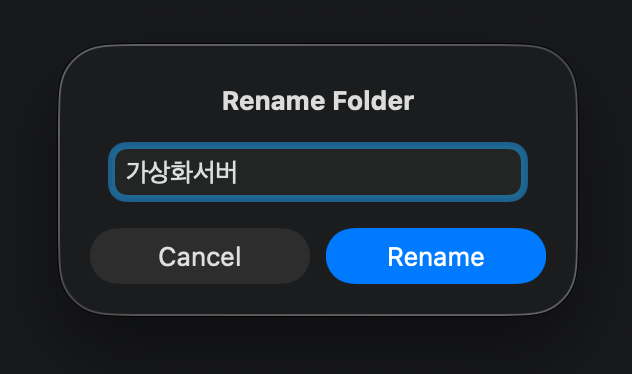
폴더 Rename 할때 기본 포커스가 명칭이 있었으면 좋겠습니다^^ - 마
마이너스아이
→ 로민건 작성자 03.04 · 61.♡.139.51
좀 더 자세히 알려 주시면 반영 하겠습니다! - 로
로민건
→ 마이너스아이 03.05 · 39.♡.110.114
왼쪽 메뉴에서 폴더를 선택하고 Rename.. 을 선택하면 첫번째 이미지 처럼 입력항목에 포커스가 없습니다.
두번째 이미지와 같이 입력항목에 포커스가 왔으면 좋겠어요~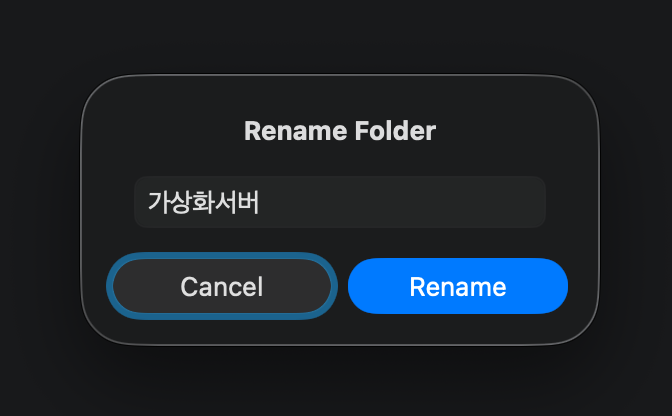
- 마
마이너스아이
→ 로민건 작성자 03.06 · 61.♡.139.51
이런 문제도 있었군요.
너무 감사드립니다. 다른 곳에도 포커스 확인 해보겠습니다. - 마
마이너스아이
→ 로민건 작성자 03.06 · 106.♡.236.154
수정완료!
댓글을 작성하려면 이 필요합니다.
대단하십니다!