
[398] 옵시디언 인터페이스 - Cheat Sheet + Markdown Note

S
 shunnna (39.♡.222.244)
2025년 5월 19일 AM 12:13
조회 322 공감 0
---
tags:
- Obsidian
Date Added: 2024-07-30
Source:
-
---
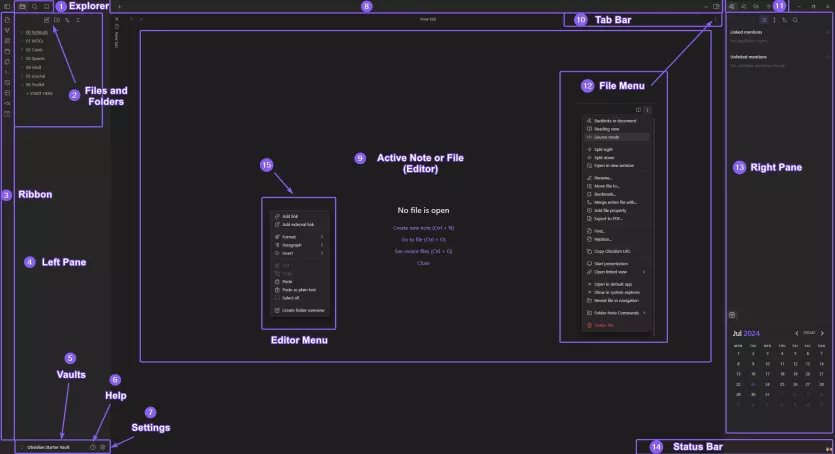
## Obsidian Interface Menu
![[Obsidian-Interface-Menu-SS.png]]
>[!info] Legend
>1. Explorer contains the Folder and Search shortcuts and you have shortcuts to create a New Note, New Folder, Change Sort Order, Collapse
>2. New Note and New Folders are accessed here
>3. The Ribbon Menu including shortcuts to Comamands are located here
>4. The Left Pane which can be expanded and collapsed
>5. Vaults can be managed here, Open or Create New Vaults
>6. This is where you can access Help Resources for Obsidian
>7. The Obsidian Settings Menu
>8. Top Bar shows you open Notes
>9. Active Note or File Editor Space
>10. The Tab Bar with a link to the File Menu
>11. Backlinks, Outgoing Links, Tags and Outline usually shown here
>12. File Menu can be accessed via the three dots here
>13. The Right Pane which can be expanded and collapsed
>14. Status Bar, shows Backlink, Editor Status, Word Count
댓글 (0)
- 아직 댓글이 없습니다. 첫 댓글을 작성해보세요!
댓글을 작성하려면 이 필요합니다.