

 윈터블루 (211.♡.124.85)
2026년 5월 11일 PM 04:47
옵시디언 쓰다가 되게 편하다고 생각 들어서 css 하나 공유합니다.
클로드한테 만들어달라 했구요. 기본 테마나 minimal테마를 사용하다보면 제목 수준이 h1인지, h2인지, h3인지 구분이 잘 안가더라구요. 아예 앞에 수준을 표기해주면 어떨까 싶어서 만들었습니다.
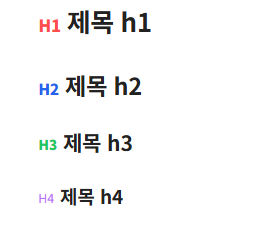
↑ 진짜 별거 없죠?
그래도 나름 고민해서 live preview 모드에서 제목 수준 표시가 중복되는 문제 고치느라 고민 많이 했습니다.
다음 내용을 snippets 폴더에 넣으시고(확장자명(*.css)) 활성화하시면 됩니다.
/* [공통 설정] 모든 헤딩 표시자의 기본 위치 및 크기 */ h1::before, h2::before, h3::before, h4::before, h5::before, h6::before, .cm-line.HyperMD-header-1::before, .cm-line.HyperMD-header-2::before, .cm-line.HyperMD-header-3::before, .cm-line.HyperMD-header-4::before, .cm-line.HyperMD-header-5::before, .cm-line.HyperMD-header-6::before { font-size: 0.65em; vertical-align: middle; margin-right: 6px; }/* [강조 그룹] H1, H2, H3 - 진하고 선명하게 표시 */
h1::before, .cm-line.HyperMD-header-1::before,
h2::before, .cm-line.HyperMD-header-2::before,
h3::before, .cm-line.HyperMD-header-3::before {
font-weight: 800;
opacity: 1;
}/* [저채도 그룹] H4, H5, H6 - 차분한 회색 및 흐림 처리 */
h4::before, .cm-line.HyperMD-header-4::before,
h5::before, .cm-line.HyperMD-header-5::before,
h6::before, .cm-line.HyperMD-header-6::before {
font-weight: normal;
color: #888;
opacity: 0.9;
}/* [개별 색상 및 문구 설정] */
/* H1: 빨강 */
h1::before, .cm-line.HyperMD-header-1::before { content: "H1"; color: #ff4d4d; }/* H2: 짙은 파랑 (보정됨) */
h2::before, .cm-line.HyperMD-header-2::before { content: "H2"; color: #2563eb; }/* H3: 초록 */
h3::before, .cm-line.HyperMD-header-3::before { content: "H3"; color: #22c55e; }
/* H4, H5, H6: 문구만 설정 */
h4::before, .cm-line.HyperMD-header-4::before { content: "H4"; }
h5::before, .cm-line.HyperMD-header-5::before { content: "H5"; }
h6::before, .cm-line.HyperMD-header-6::before { content: "H6"; }
최근 글
최근 댓글
- 이번에 주니퍼 업데이트하고 그록을 처음으로 써봤는데 자유분방모드 켜고 "안녕?" 이라고 하자마자 욕을 욕을... 🦧🦧
- 처음 사진보고 키보드랬는데 왜 돌덩이가... 했네요. 키보드 진짜 이쁘네요
- 전용 기능 개발이라기 보다는... 현재 미국산 테슬라랑 중국산 테슬라의 EAP 기능이 다르지 않나요? dcas02에는 차량의 자동 차선 변경이나
- FSD 어레인지는 좀 힘들거 같고 판매량을 등에 업고 NOA 정도는 업그레이드를 해주지 않을까... 그정도만 되도 성공적이라고 봅니다...
- 주니퍼 타보니, 전조등은 자동으로 켜지고 후방 안개등은 설정 들어가서 켜줘야만 하던데, 전에 한번 켜봤던 적이 있던 사람일까요? 이거 켰다가 시
댓글 (3)
-
 냥
냥냥아치
05.11 · 59.♡.163.88
- 윈
윈터블루
→ 냥아치 작성자 05.11 · 116.♡.16.63
글자에 색입히면 또 너무 형형색색이어서 ㅎㅎ
- M
maronet
06.18 · 121.♡.115.114
오~ 잘 쓰겠습니다!!!
댓글을 작성하려면 이 필요합니다.
오 전 그냥 색 다르게 하는 정도로 고쳐서 쓰고 있는데 아예 앞에 H1, H2 표시해주면 알아보기 편하겠네요!